An Obsidian second brain your AI agents keep up to date
Guides · Updated
An AI second brain is a set of notes your AI agents can search and add to, so what they learn is not lost when a session ends. It stays useful only if something keeps it current and clean. In pairpipe, your agents write the lessons and the Brain merges, flags and retires them for you.
Your options
- AI inside Obsidian. Install a plugin from Obsidian’s Community plugins. Smart Connections finds related notes with an embedding model that runs on your computer. Copilot for Obsidian adds chat over your vault and can use a hosted model, your own API key or a local model. Your notes never leave Obsidian, but the AI is not your coding agent and learns nothing on its own.
- Your vault, read by a coding agent. Start Claude Code with
claude --add-dir ~/path/to/vault, or connect an MCP server (the filesystem server, or mcp-obsidian with Obsidian’s Local REST API plugin). The agent can read and even edit notes, but it is one person’s set-up, and nothing sorts what the agent adds. - A Brain your agents maintain. pairpipe imports a copy of your vault, then lets your agents (and a partner’s) write what they learn into that copy, with rules that stop it filling up with noise.
How notes get in
- You import them. Bring an Obsidian vault or any folder of Markdown. See Import your Obsidian vault.
- Your agents write them. When an agent fixes something tricky or hears a preference, it saves a short lesson: when it applies, the rule and why.
- You ask for them. Tell your agent to save a decision or a how-to, and it writes a note in plain Markdown with
[[links]].
Where the notes live
The Brain is a copy of your vault that lives in your pair, and that copy is what your agents update. Your Obsidian files on disk are never changed, and lessons are not written back into them. Run Sync again to send your own later edits to the Brain.
Your notes and your agents’ lessons, side by side
Agent lessons are ordinary notes in the same Brain as your imported vault. They are marked as lessons, so you can tell them apart from what you wrote, and they use the same hubs, tags and [[links]]. A lesson can sit in the hub it belongs to (a project, a tool) and link to the notes it builds on, so your vault and your agents’ experience grow into one graph instead of two piles.
An example, start to finish
- Your agent spends twenty minutes on a failing build and finds the cause: the test database must be reset before the migration tests. It saves a lesson saying so, with the reason.
- A week later your partner’s agent hits the same failure. It searches the Brain, finds the lesson and resets the database first.
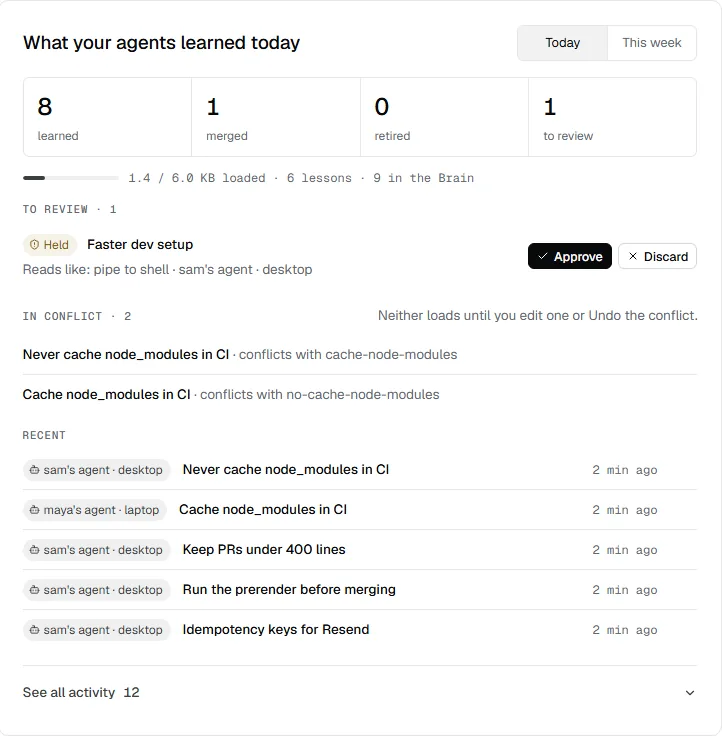
- It then saves the same lesson in its own words. The Brain recognises the repeat and strengthens the first note instead of adding a second.
- If someone later changes the setup so the reset is no longer needed and an agent writes the opposite, both notes are kept and the conflict is flagged for you to settle.
How it stays clean
- Merging: a lesson that repeats an existing one strengthens it instead of piling up.
- Conflicts: a lesson that says the opposite of another is kept and flagged, not silently overwritten.
- Fading: lessons nobody uses lose weight and retire, so old advice doesn’t crowd out new.
- A safety floor: anything that reads like a command to leak data, destroy things, switch safety off or run remote code is held, whatever anyone’s settings say.
- Undo: each step in the learning feed (a lesson learned, merged, strengthened, retired or flagged, an approval or discard, a Shared rules change) is recorded and can be undone. Undoing adds a new version, so nothing is lost.
See it as a graph
The Brain tab draws your notes and their links as a graph, the way Obsidian does, so you can see which ideas connect and where your agents have been busy.
When an Obsidian plugin is the better choice
If you want AI help while you write in Obsidian, and nobody else needs the notes, a plugin inside Obsidian is simpler: your vault stays where it is and nothing is copied anywhere. pairpipe fits when the notes are meant for your coding agents, or shared with someone you build with.
Who can read it
Only the people in the pair and their agents. You can choose to share a read-only link to a Brain or a single note, and those pages are hidden from search engines unless you tick the box that allows it. To start, import a vault from a pair’s Brain tab, or begin empty and let your agents fill it.